The Ultimate Guide to Using a Google Doc Calendar Template
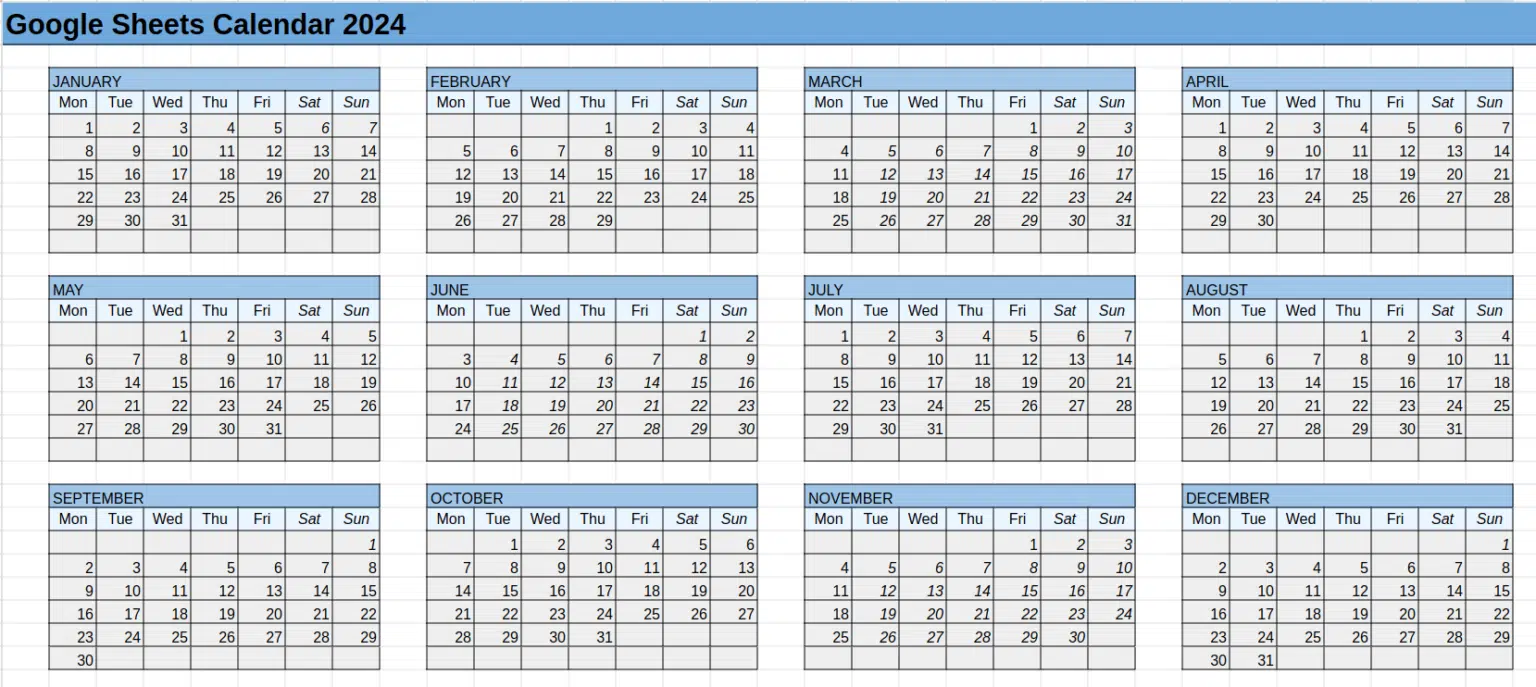
Staying organized is one of the biggest challenges in today’s fast-paced world. Whether you are a student, a professional, or someone managing a busy household, having a reliable calendar can make all the difference. While there are plenty of scheduling tools available, one resource that continues to gain popularity is the Google Doc Calendar Template.
This simple yet powerful tool offers the flexibility of Google Docs while providing the structure you need to manage your tasks, events, and deadlines. In this guide, we’ll explore what makes Google Doc calendar templates so useful, how to use them effectively, and why they might be the perfect solution for your productivity needs.
What Is a Google Doc Calendar Template?
A Google Doc calendar template is a pre-designed document that lays out the framework of a calendar within Google Docs. Instead of creating a calendar from scratch, users can start with a template and customize it to fit their needs.
These templates can be used for:
- Monthly planning – Keeping track of important dates, deadlines, and events.
- Weekly schedules – Breaking down tasks into manageable chunks for each week.
- Event planning – Organizing meetings, conferences, or personal events.
- Goal tracking – Recording milestones and achievements over time.
Because it’s built inside Google Docs, it’s accessible from any device, shareable with others, and easy to edit in real time.
Why Choose a Google Doc Calendar Template Over Other Tools?
There are plenty of digital calendar apps available, so why choose a Google Doc calendar template? Here are some compelling reasons:
- Simplicity – Unlike complex apps that require a learning curve, Google Docs is easy to use.
- Customization – You can modify colors, fonts, and layouts to make the calendar uniquely yours.
- Accessibility – Since it’s cloud-based, your calendar can be accessed anywhere with an internet connection.
- Collaboration – Share your calendar with colleagues, friends, or family to coordinate schedules.
- Free of cost – Google Docs and its templates are free, making it budget-friendly.
For individuals who prefer the familiarity of word processors over complex scheduling tools, this is the ideal option.
How to Access and Use a Google Doc Calendar Template
Getting started with a calendar template in Google Docs is simple. Here’s a step-by-step guide:
- Open Google Docs – Log in to your Google account and navigate to Google Docs.
- Search for Templates – From the template gallery, you can find pre-made calendar layouts.
- Choose a Format – Select a monthly, weekly, or yearly calendar based on your preference.
- Customize – Edit dates, add tasks, and change the design to suit your needs.
- Share or Print – Share your calendar with team members or print a physical copy for offline use.
Pro tip: You can also create your own template once and reuse it for future months or years.
Different Ways to Use a Google Doc Calendar Template
One of the best features of a Google Doc calendar template is its versatility. Here are some ways you can put it to work:
1. Academic Planning
Students can use it to mark exam dates, assignment deadlines, and study sessions.
2. Business and Project Management
Teams can collaborate on deadlines, meetings, and project milestones using a shared calendar.
3. Personal Productivity
From gym sessions to meal planning, a template can help individuals organize daily routines.
4. Event Coordination
Planning a wedding, birthday party, or conference? A calendar template can help keep everything on track.
5. Content Planning
Bloggers and social media managers often use calendars to plan posts, campaigns, and engagement strategies.
Benefits of Using Google Docs for Scheduling
When compared to paper planners or third-party apps, Google Docs offers unique advantages:
- Real-time updates – Multiple people can update the calendar simultaneously.
- Integration – It can work alongside Google Sheets, Google Calendar, and Gmail.
- Cloud storage – Your data is safely stored in the cloud, with no risk of losing your schedule.
- Offline editing – With offline access enabled, you can update your calendar even without the internet.
These benefits make it more than just a simple document — it becomes a living tool that adapts to your workflow.
Tips for Maximizing Productivity with a Google Doc Calendar Template
To get the most out of your calendar, consider these practical tips:
- Color coding – Assign different colors to categories such as work, school, or personal tasks.
- Set reminders – Use Google Calendar integration to add alerts for important dates.
- Break tasks into smaller goals – Don’t just write “Finish project”; instead, list steps like “Draft outline,” “Review notes,” and “Submit final copy.”
- Review weekly – At the start of each week, update and review your schedule to stay ahead.
- Keep it simple – Avoid overloading your calendar. Stick to essentials for clarity.
By implementing these techniques, your calendar becomes more than a schedule — it becomes a roadmap to success.
Why Readers of This Week Should Care
At This Week, we’re dedicated to providing readers with practical tools and insights that make everyday life more manageable. The Google Doc calendar template is an excellent example of how free, simple resources can have a big impact on productivity.
Whether you’re running a small business, managing a family schedule, or simply trying to stay organized, using a calendar template in Google Docs can streamline your routine and reduce stress.
Future of Digital Scheduling
As technology advances, digital calendars will continue to evolve. AI-powered assistants are already integrating with scheduling tools, offering personalized recommendations, reminders, and time-blocking suggestions. In the near future, we may see:
- Automated task scheduling based on workload and priorities.
- Cross-platform synchronization across all devices seamlessly.
- Integration with productivity apps like Slack, Trello, and Notion.
- Voice-command scheduling through smart devices.
While these features are exciting, the core benefit remains the same: a reliable, easy-to-use system for staying organized.
Final Thoughts
The Google Doc Calendar Template is more than just a digital version of a planner. It’s a customizable, shareable, and user-friendly tool that can help anyone manage their time more effectively. By leveraging the flexibility of Google Docs, you can create a calendar that truly works for your lifestyle.
From academic success to business efficiency, and from personal productivity to event planning, the possibilities are endless. And best of all, it’s free, accessible, and easy to use.
At This Week Report, we believe that small tools like these can make a big difference. If you’ve been struggling to stay on top of your schedule, now is the perfect time to explore what a Google Doc calendar template can do for you.