
100 Secret Mobile Codes the Pros Use
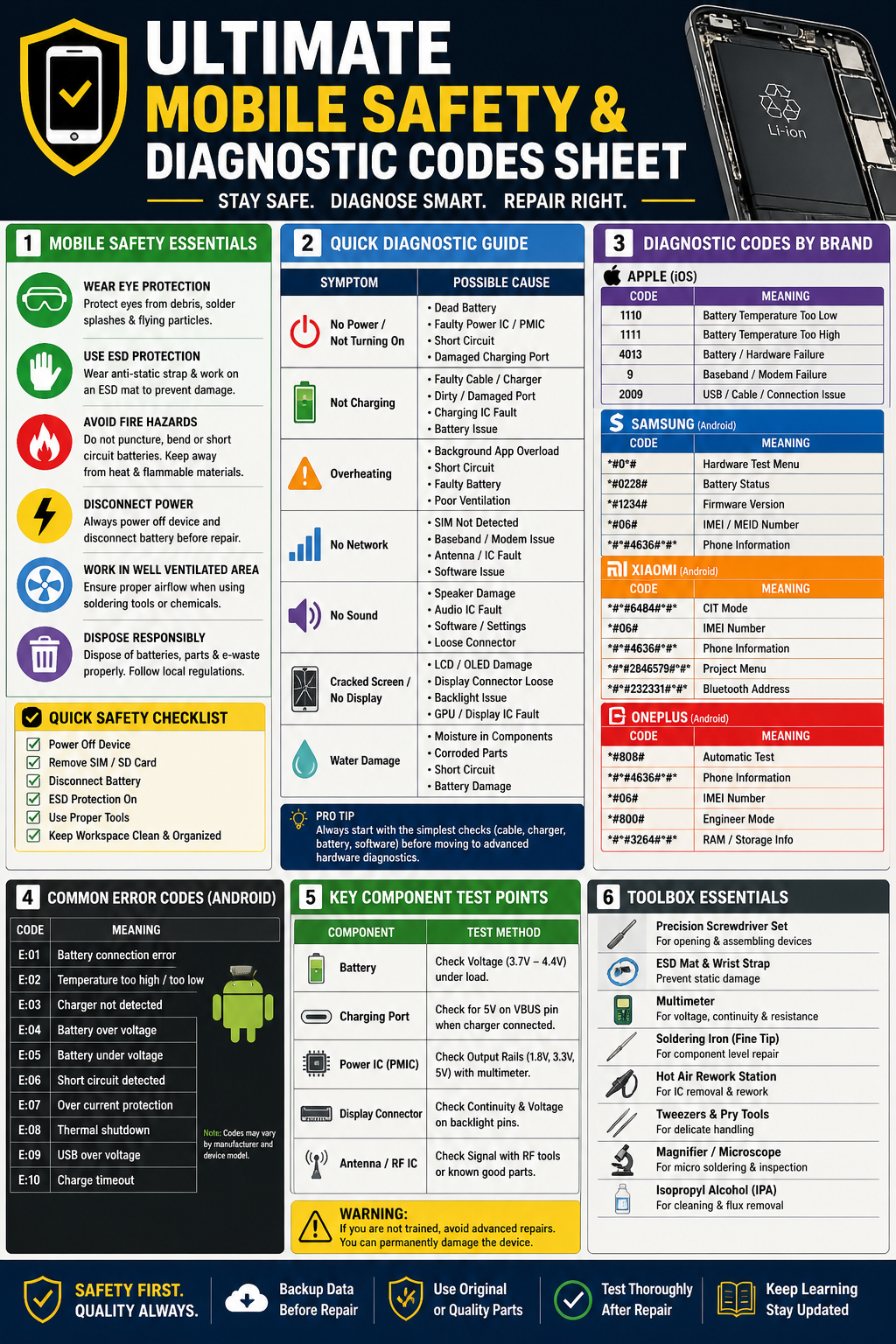
In today’s hyper-connected world, your smartphone is both your greatest asset and a significant liability. From the risk of digital arrest and financial cyber fraud to the physical dangers of radiation and road accidents, maintaining “mobile hygiene” is a professional necessity. This article serves as a research-based, all-in-one guide to securing your digital life, protecting your health, and accessing emergency help using 100 essential numbers and codes.
How to Detect Malware, Check Radiation, and Stop Spies Instantly.
1. Identity & Network Integrity: The Mobile Audit
Protecting your identity starts with knowing who is using it. Criminals often register SIM cards using stolen ID documents to conduct illegal activities.
- The SIM Check (TAFCOP): Regularly visit the government’s Sanchar Saathi portal to verify every mobile number registered under your Aadhaar or ID. If you see a number you don’t recognize, report it immediately to have it blocked.
- Device Identity (IMEI): Every phone has a unique 15-digit IMEI (International Mobile Equipment Identity) number. Dialing
*#06#will display this number. You must record this elsewhere; without it, police cannot track or block your device if it is stolen.
2. The Silent Signal: Smartphone Radiation (SAR)
All mobile devices emit radiofrequency energy. The industry standard for safety is the Specific Absorption Rate (SAR).
- Checking Your Levels: By dialing
*#07#, you can instantly view your phone’s SAR value. - The Safety Benchmark: The legal limit in India and the US is 1.6 W/kg. If your device exceeds this, it is technically non-compliant with health safety standards.
- Safety Tip: To further reduce exposure, use wired earphones for long calls and avoid using your phone in elevators or basements where the device must increase its power output to find a signal.
3. Cyber Fraud & Financial Defense
Financial cybercrime is a multi-billion-dollar industry. Time is the most critical factor when you have been defrauded.
- The “Golden Hour”: If you lose money to a digital scam, dial 1930 or 155260 immediately. This connects you to the National Cyber Crime Reporting Helpline, which has the authority to freeze stolen funds before they are withdrawn from the banking system.
- Identity Theft: For Aadhaar-related issues or identity fraud, dial 1947 to reach UIDAI.
4. Physical Safety: Road Accidents & Emergencies
Mobile safety extends to physical survival, especially on highways where accidents are frequent.
- Highway Emergencies: If you are involved in or witness an accident on a National Highway, dial 1033 to reach the NHAI helpline for immediate medical and towing assistance.
- Traffic & Road Accidents: General road safety assistance can be reached via 1073.
- Universal Help: The number 112 is the national integrated emergency line for police, fire, and medical aid.
5. Privacy & Anti-Spying Measures
Malicious apps or people can sometimes set up “Call Forwarding” on your device to intercept your OTPs (One-Time Passwords) or personal calls.
- The Privacy Audit: Dial
*#21#to check if your calls, SMS, or data are being forwarded to another number without your knowledge. Use*#62#to check if calls are redirected when your phone is unreachable. - The Universal Reset: If you suspect someone is spying on you, dial
##002#. This is a “universal de-spy” code that deactivates all call forwarding services instantly.
The Master Reference List: 100 Critical Numbers & Codes
Below is the complete database of codes and helplines as categorized in the Ultimate Mobile Safety & Diagnostic Codes Sheet.
| No. | Code/Number | Category | Description / Action |
| 1 | 112 | Emergency | National Integrated Emergency (Police/Fire/Medical) |
| 2 | 100 | Emergency | Police Control Room |
| 3 | 101 | Emergency | Fire Services |
| 4 | 102 | Emergency | Ambulance Services |
| 5 | 108 | Emergency | Disaster Management/Medical Helpline |
| 6 | 1033 | Road Safety | NHAI Highway Accident Helpline |
| 7 | 1073 | Road Safety | Road Accident/Traffic Helpline |
| 8 | 1930 | Cyber Security | National Cyber Crime Reporting Helpline (Financial Fraud) |
| 9 | 1091 | Women Safety | Women Helpline (Safety in distress) |
| 10 | 181 | Women Safety | Domestic Abuse/Women Power Line |
| 11 | 1098 | Child Safety | Childline (Protection against abuse/labor) |
| 12 | 14567 | Elderly Safety | Elderline (Senior Citizen Support) |
| 13 | 139 | Transport | Integrated Railway Security & Inquiry |
| 14 | 1906 | Safety | LPG Gas Leakage Emergency |
| 15 | 1072 | Safety | Railway Accident Information |
| 16 | 1071 | Safety | Air Accident Information |
| 17 | 1070 | Safety | Relief Commissioner (Natural Calamities) |
| 18 | 1915 | Consumer Safety | National Consumer Helpline |
| 19 | 1947 | Identity | Aadhaar (UIDAI) Help & Identity Theft |
| 20 | 155260 | Cyber Security | Original Digital Fraud Portal Number |
| 21 | *#06# | Identity | Show IMEI Number (Essential for tracking/blocking) |
| 22 | *#07# | Health | Check SAR (Radiation) Value – Safe limit is 1.6 W/kg |
| 23 | *#21# | Privacy | Check Call/SMS/Data Forwarding status |
| 24 | ##002# | Security | Deactivate all call forwarding (Universal De-spy) |
| 25 | *#62# | Privacy | Check redirection when phone is unreachable |
| 26 | *#*#4636#*#* | Diagnostics | Hidden Testing Menu (Battery/Wi-Fi/Usage Stats) |
| 27 | *#*#0#*#** | Hardware | LCD/Screen/Color Test (Android) |
| 28 | *#*#2664#*#* | Hardware | Touchscreen Responsiveness Test |
| 29 | *#*#0673#*#* | Hardware | Speaker & Audio Hardware Test |
| 30 | *#*#0842#*#* | Hardware | Vibration & Backlight Test |
| 31 | *#*#232338#*#* | Network | Show Wi-Fi MAC Address |
| 32 | *#*#232337#*#* | Network | Show Bluetooth Device Address |
| 33 | *#*#1472365#*#* | Hardware | Quick GPS Accuracy Test |
| 34 | *#*#1575#*#* | Hardware | Advanced GPS Hardware Analysis |
| 35 | *#*#0588#*#* | Hardware | Proximity Sensor Test |
| 36 | *#*#3264#*#* | Hardware | Check RAM Version and Capacity |
| 37 | *#*#1234#*#* | Software | Show PDA and Software Version |
| 38 | *#*#1111#*#* | Software | Show FTA Software Version |
| 39 | *#*#2222#*#* | Hardware | Show FTA Hardware Version |
| 40 | *#*#44336#*#* | Software | Display Build Time and Change List |
| 41 | *31# | Privacy | Enable Outgoing Caller ID Hiding |
| 42 | #31# | Privacy | Disable Outgoing Caller ID Hiding |
| 43 | *43# | Calling | Activate Call Waiting |
| 44 | #43# | Calling | Deactivate Call Waiting |
| 45 | *#43# | Calling | Check Call Waiting Status |
| 46 | *#67# | Privacy | Check forwarding when line is Busy |
| 47 | *#61# | Privacy | Check forwarding when there is No Reply |
| 48 | *#33# | Security | Check Call Barring status |
| 49 | *#*#8351#*#* | Diagnostics | Enable Voice Dialing Log Mode |
| 50 | *#*#8350#*#* | Diagnostics | Disable Voice Dialing Log Mode |
| 51 | *#9090# | System | Diagnostic Configuration (Service Mode) |
| 52 | *#7465625# | Security | Check Network/Phone Lock status |
| 53 | *#0#* | Hardware | Samsung Universal Test Menu |
| 54 | *#9900# | System | Samsung SysDump (Clear Log/Free RAM) |
| 55 | *#0228# | Health | Samsung Advanced Battery Status/Calibration |
| 56 | *#0808# | System | Samsung USB Settings |
| 57 | *#12580*369# | Software | Samsung Hardware/Software Combined Info |
| 58 | *#808# | Hardware | OnePlus Engineering Mode |
| 59 | *#*#6484#*#*#* | Hardware | Xiaomi Hardware Diagnostic Menu |
| 60 | *#*#2846579#*#*#* | Hardware | Huawei Project Menu |
| 61 | *3001#12345#* | Network | iPhone Field Test Mode (Signal Strength) |
| 62 | *#*#7378423#*#*#* | System | Sony Service Menu |
| 63 | *#*#34971539#*#* | Hardware | Detailed Camera Firmware Info |
| 64 | *#*#232339#*#* | Network | Wireless LAN Speed/Connectivity Test |
| 65 | *#*#197328640#*#* | System | Network Service Mode |
| 66 | *#*#7594#*#* | System | Change Power Button Behavior (Instant Shutdown) |
| 67 | *#*#232331#*#* | Hardware | Bluetooth RF Hardware Test |
| 68 | 1075 | Health | National Health Helpline (Infectious Diseases) |
| 69 | 14444 | Banking | Digital Payment/UPI Help (NPCI) |
| 70 | 1800-11-4422 | Cyber Security | Secondary National Cyber Fraud Helpline |
| 71 | 1094 | Safety | Missing Persons (Women/Children) Helpline |
| 72 | 14433 | Legal | National Human Rights Commission (NHRC) |
| 73 | 1551 | Farmer Safety | Kisan Call Centre (Agriculture Support) |
| 74 | 1800-11-0007 | Health | National AIDS Helpline |
| 75 | 1363 | Tourist Safety | Multilingual Tourist Helpline |
| 76 | 1066 | Health | Anti-Poison Helpline (AIIMS) |
| 77 | 14456 | Social | Persons with Disabilities Helpline |
| 78 | 1097 | Health | National Blood Bank Helpline |
| 79 | 1912 | Safety | Electricity Complaints/Emergency |
| 80 | 103 | Safety | Traffic Police (Major Cities) |
| 81 | 1090 | Women Safety | Women Power Line (UP/Various States) |
| 82 | 1093 | Safety | Northeast Citizen Helpline |
| 83 | 1096 | Safety | Crime Against Women Helpline |
| 84 | 1.6 W/kg | Standard | Legal SAR Limit for Safety (India/USA) |
| 85 | 5 Presses | Action | Standard Trigger for Emergency SOS |
| 86 | *#*#7780#*#* | System | Factory Soft Reset (Removes Accounts/Apps) |
| 87 | *2767*3855# | System | Hard Factory Reset (Full Wipe) |
| 88 | *#*#225#*#* | System | Calendar Info/Events |
| 89 | *#*#426#*#* | System | Google Play Services Monitor |
| 90 | *#*#759#*#* | System | Rlz Debug Interface |
| 91 | *#872564# | Network | USB Logging Control |
| 92 | *#301279# | Network | HSDPA/HSUPA Control Menu |
| 93 | *#*#36245#*#* | System | Email Debug Info |
| 94 | *#*#8255#*#* | System | G-Talk Service Monitor |
| 95 | *#*#273283*255*663282*#*#* | Data | Backup Media Files to Device |
| 96 | *#*#232337#*# | Network | Bluetooth Address Display |
| 97 | 1122 | Emergency | Secondary Fire/Emergency (Selected Regions) |
| 98 | 1077 | Safety | District Authority (Disaster Mgmt) |
| 99 | 103 | Traffic | Delhi/Mumbai Traffic Police Direct |
| 100 | *121# | Telecom | Universal Balance/Usage Check (Airtel/Voda) |
Harmful App Check
Modern malware does not always appear as a “virus.” Often, it is a legitimate-looking app that has over-reached its permissions.
- Audit Permissions: At least once a month, go to Settings > Privacy > Permission Manager. If a simple flashlight app has access to your contacts and microphone, delete it immediately.
- Play Protect: Ensure Google Play Protect is active. It scans your apps daily for malicious behavior.
- Avoid Sideloading: Never install apps from third-party websites or “cracked” links sent via WhatsApp. These are the primary vectors for banking trojans.
By mastering these 100 points, you transition from a passive user to an empowered mobile owner, capable of navigating both the digital and physical world with confidence.
Complete Guide for Technicians & Advanced Users
Smartphone repair and diagnostics require a combination of technical knowledge, safety awareness, and the right tools. This guide consolidates essential safety practices, diagnostic codes, troubleshooting workflows, and testing methods into one comprehensive reference.
1. Mobile Safety Essentials
Before performing any repair or diagnostic procedure, safety must be your top priority.
Key Safety Practices
- Wear Eye Protection: Prevent injury from sparks, debris, or solder splashes.
- Use ESD Protection: Anti-static wrist straps and mats prevent damage to sensitive ICs.
- Avoid Fire Hazards: Lithium-ion batteries can ignite if punctured or shorted.
- Disconnect Power: Always power off devices and disconnect batteries before repair.
- Ensure Ventilation: Especially important when soldering or using chemicals.
- Proper Disposal: Dispose of batteries and e-waste according to regulations.
Quick Safety Checklist
- Power off device
- Remove SIM/SD card
- Disconnect battery
- Use ESD protection
- Use correct tools
- Maintain a clean workspace
2. Quick Diagnostic Workflow
A structured diagnostic approach improves efficiency and accuracy.
| Symptom | Possible Cause |
|---|---|
| Device not turning on | Dead battery, PMIC failure, short circuit |
| Not charging | Faulty cable/charger, charging IC, port damage |
| Overheating | Battery issue, background apps, short circuit |
| No network | SIM issue, baseband fault, antenna problem |
| No sound | Speaker damage, IC fault, software issue |
| No display | LCD damage, loose connector, GPU fault |
| Water damage | Corrosion, short circuits, component failure |
Pro Tip
Start with basic checks (charger, cable, battery) before moving to board-level diagnostics.
3. Diagnostic Codes by Brand
Android (General Codes)
| Code | Function |
|---|---|
| *#06# | IMEI number |
| #0# | Hardware test menu (many devices) |
| ##4636## | Phone information & usage stats |
| ##2664## | Touch screen test |
| ##232339## | WiFi test |
Samsung Devices
| Code | Function |
|---|---|
| #0# | Full hardware test |
| *#1234# | Firmware version |
| *#0228# | Battery status |
| *#06# | IMEI |
| *#0808# | USB settings |
Xiaomi Devices
| Code | Function |
|---|---|
| ##6484## | CIT (hardware test mode) |
| *#06# | IMEI |
| ##4636## | Device information |
| ##273282255663282*## | Backup menu |
OnePlus Devices
| Code | Function |
|---|---|
| *#800# | Engineering mode |
| *#808# | Automatic test |
| *#06# | IMEI |
| ##4636## | Device info |
iPhone (iOS)
| Code | Function |
|---|---|
| *#06# | IMEI |
| 3001#12345# | Field test mode |
4. Common Android Error Codes
| Error Code | Meaning |
|---|---|
| E:01 | Battery connection error |
| E:02 | Temperature abnormal |
| E:03 | Charger not detected |
| E:04 | Battery over-voltage |
| E:05 | Battery under-voltage |
| E:06 | Short circuit detected |
| E:07 | Overcurrent protection |
| E:08 | Thermal shutdown |
| E:09 | USB over-voltage |
| E:10 | Charging timeout |
5. Key Component Test Points
Battery
- Normal voltage: 3.7V – 4.4V
- Check under load conditions
Charging Port
- Verify 5V input on VBUS pin
- Inspect for corrosion or loose pins
Power IC (PMIC)
- Measure output rails: 1.8V / 3.3V / 5V
Display Section
- Check connector continuity
- Verify backlight voltage
RF / Antenna
- Use RF tools or known working parts
- Check signal path integrity
6. Essential Repair Tools
Every technician should maintain a professional toolkit:
- Precision screwdriver set
- ESD mat & wrist strap
- Digital multimeter
- Soldering iron (fine tip)
- Hot air rework station
- Tweezers & pry tools
- Magnifier or microscope
- Isopropyl alcohol (IPA)
7. Best Practices for Repair
- Always backup data before repair
- Use original or high-quality spare parts
- Avoid unnecessary heating of motherboard
- Test device thoroughly after repair
- Keep updated with latest repair techniques
8. Warning for Beginners
Advanced board-level repairs (like IC replacement or reballing) require proper training. Incorrect handling can cause permanent device damage.